


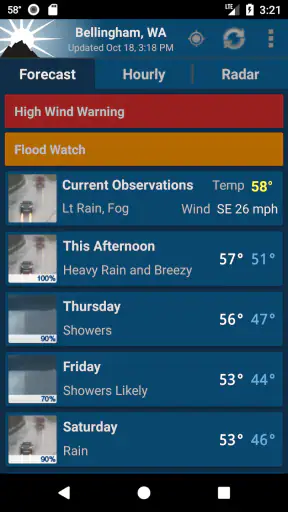
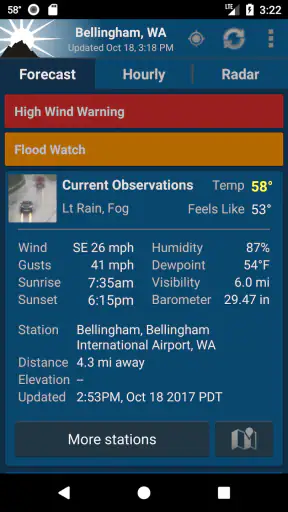
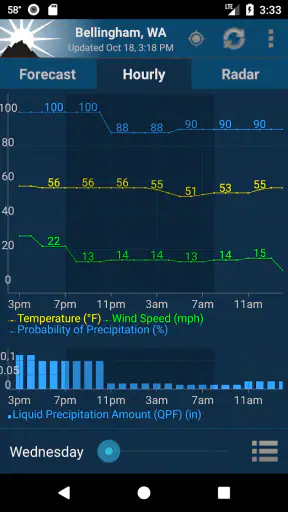
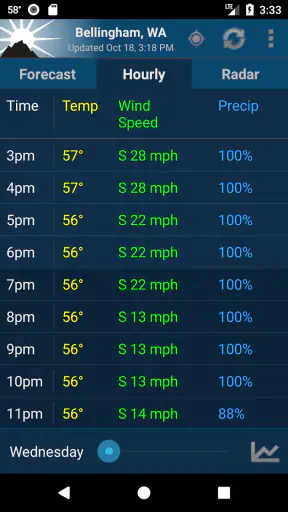
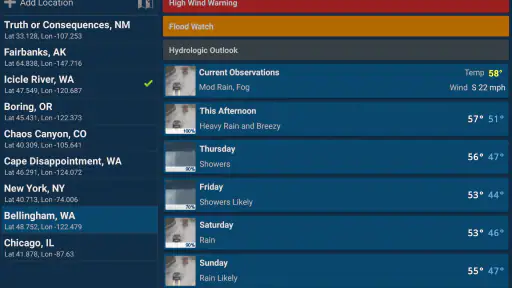
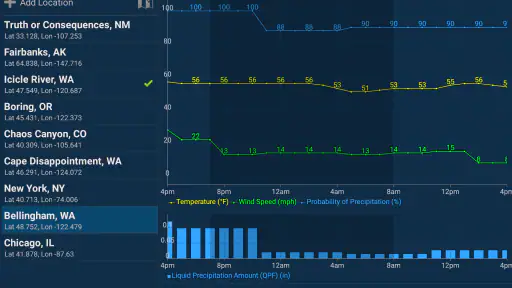
I use weather apps for one reason first: I want to make a sensible decision before I leave home. A forecast can look impressive, but it is only useful if I can quickly understand what it means for my exact location, whether rain is approaching, and how much confidence I should place in the information. NOAA Weather Unofficial takes a focused approach to that problem. It is a free weather app from Granite Apps, built around NOAA forecasts and radar rather than a broad lifestyle dashboard.
That focus makes it interesting for people who prefer practical weather information over a crowded screen. It also creates a clear trade-off. If you want a simple way to check local conditions and radar, this app has a strong case. If you expect a polished all-in-one service with lots of extras, visual effects, or a worldwide experience, another type of weather app may suit you better.
How I Decide Whether a Weather App Is Worth Keeping
My first test is speed. When I am standing by the door, I do not want to dig through several screens to find the current forecast. I want the app to identify the right location, show the relevant NOAA information, and let me move on. The second test is usefulness during changing conditions. A daily forecast is helpful, but radar becomes more valuable when clouds are building and I need to know whether the rain is likely to reach me soon.
The third test is clarity. Weather information can become confusing when an app puts too many numbers, icons, alerts, and promotional panels together. NOAA Weather Unofficial benefits from having a narrower purpose. Its store summary centers on NOAA forecast and radar for an exact location, so the app is aimed at people who want dependable access to those core tools rather than a general content feed.
I also consider how well an app fits a person’s habits. Someone who checks the weather once each morning has different needs from a cyclist, gardener, dog walker, commuter, or person who works outdoors. The best choice is not automatically the app with the most features. It is the one that gives the right information with the least friction for a particular routine.
There is also a practical compatibility question. The app supports Android versions from 6.0 onward, which covers a wide range of devices, including some older phones that cannot comfortably run newer software. Its current version is 2.18.1, and that is useful context for anyone deciding whether an older handset can still be used for a dedicated weather tool.
What the NOAA focus changes in everyday use
NOAA Weather Unofficial is not trying to be a news application, a travel planner, or a social weather network. Its identity comes from presenting NOAA-based forecast and radar information in an accessible mobile format. I find that helpful when I want to separate the forecast itself from commentary, lifestyle articles, or dramatic weather headlines.
That does not mean the app can remove uncertainty from weather. No forecast can guarantee exactly when a shower will begin at one specific street, and radar interpretation still requires a little judgment. The advantage is that the app gives me a direct place to inspect the forecast and radar instead of relying only on a single daily icon.
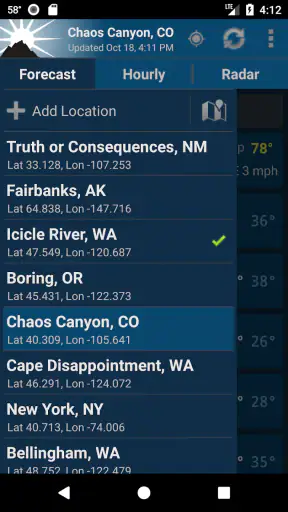
For a local user, the exact-location emphasis is especially important. A forecast for a nearby city can be noticeably different from conditions at home, particularly around hills, coastlines, open fields, or dense urban areas. I would still check that the selected location is correct after installation, because a weather app is only as useful as the place it is actually monitoring.
Where this app is strongest
The biggest strength is focus. NOAA Weather Unofficial makes sense for someone who wants a weather utility that stays close to the essentials: local forecast information and radar. I prefer that approach when I am checking whether to carry an umbrella, postpone yard work, plan a walk, or decide if a drive should happen now rather than later.
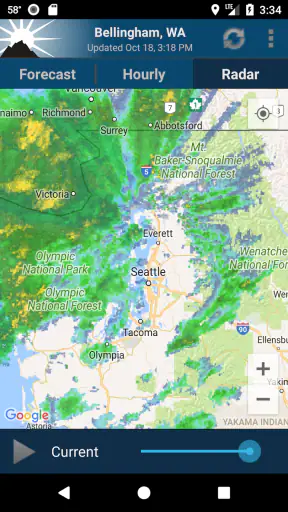
Radar is the feature I would return to most often during unsettled weather. A forecast might say rain is possible during the afternoon, while the radar view helps me understand whether precipitation is already moving toward my area. That distinction matters in real life. If I am leaving for a short errand, I may accept a chance of rain later. If a visible band is approaching, I might leave immediately or wait.
Another strength is that the app is free. That lowers the cost of trying it alongside a familiar weather service. I do not have to make a major commitment before discovering whether its presentation works for me. The Everyone content rating also makes it an uncomplicated option for a household device shared by different age groups.
The app has also built a substantial user base. It has passed one million installs, with an average rating of 4.7 from about 106 thousand ratings and roughly 36 thousand written reviews. Those figures do not prove that every person will like the interface, but they do suggest that the focused NOAA approach has worked for many users over time.
Three practical habits that make it more useful
My first tip is to use the forecast and radar for different decisions instead of treating them as interchangeable. The forecast is better for planning the shape of the day: whether conditions are likely to be wet, windy, or clear. Radar is better for timing a short activity. Looking at both prevents the common mistake of seeing a “rainy day” label and assuming rain will last continuously.
My second tip is to check the location before trusting a surprising result. Exact-location weather is valuable, but it also means that an incorrect location can quietly produce a forecast that seems plausible while being wrong for your plans. I would make location verification part of the first setup, especially if I travel regularly or use the app on a phone with location settings that change.
My third tip is to use the app as a decision aid, not as a promise. For a picnic, school run, or commute, I would compare the forecast period with the radar movement and leave a little flexibility. That workflow is more reliable than checking one icon once and assuming the entire day will follow it.
Where another kind of weather app may fit better
The main alternative is a broad commercial weather app. Those services often try to combine forecasts with news, maps, video, severe-weather content, widgets, and highly visual interfaces. I am not assigning any specific feature or quality to a particular competitor, but this category can be a better match if you want one app to cover many weather-related activities.
A general-purpose app may also feel more convenient for travelers who regularly move between countries or regions. NOAA Weather Unofficial is most compelling when NOAA information is the central reason for opening the app. If your daily life involves international travel, multiple forecasting systems, or location changes across different regions, you may prefer a service designed around broader geographic coverage.
Another alternative is the default weather app already installed on a phone. That option usually wins on convenience because it requires no separate setup and may connect naturally with the operating system. For someone who only wants a quick temperature glance, installing a dedicated NOAA app may feel unnecessary. I would choose NOAA Weather Unofficial when forecast and radar access matter enough to justify having a separate tool.
There is also a difference between a forecast app and an alert-first service. If your priority is receiving urgent warnings, you should judge any weather app by how well it fits that specific need rather than assuming a forecast-and-radar tool replaces every official notification channel. NOAA Weather Unofficial is easier to recommend for checking conditions and planning activities than as the sole source for serious emergency decisions.
The small friction points I would consider first
A focused app can feel limited if you expect entertainment, extensive customization, or a magazine-style weather experience. I would not install this expecting a stream of articles or a large collection of unrelated tools. Its value comes from reducing weather information to something more direct, and that simplicity may feel too plain for people who enjoy elaborate visual dashboards.
Radar also has a learning curve. New users sometimes read a colored pattern as a precise prediction of what will happen at their front door. In practice, radar shows movement and intensity in a way that still needs interpretation. I would give myself a few days of comparing what the radar suggested with what actually happened. That makes the display more useful and prevents overconfidence.
There is a second trade-off in relying on a particular forecasting source. A local forecast can be strong for one area and less satisfying for another, so I would judge the app using the places I actually visit rather than assuming my experience will match someone else’s. If a different service consistently gives more useful local detail for your region, switching may be sensible even if you like the app’s design.
What switching feels like in practice
Moving from a default weather app to NOAA Weather Unofficial should be relatively easy if your goal is simply to gain a dedicated place for NOAA forecast and radar information. The real adjustment is not learning a complicated system; it is changing the way you check weather. Instead of glancing at one temperature number, I would build a short routine: confirm the location, read the relevant forecast period, then inspect radar when timing matters.
The cost of switching is mostly attention. You may need to decide which app becomes your normal morning check, remember where the radar view is, and avoid consulting several services until their different wording creates confusion. I recommend using one app as the primary source for ordinary planning and keeping another only for a specific purpose, such as a familiar travel workflow or official emergency information.
Because this app is free, trying it does not require a financial decision. That makes a side-by-side test practical. Use it for a week of normal routines: commuting, shopping, outdoor exercise, and one day with changing weather. Notice whether the forecast is easy to interpret and whether the radar actually changes your decisions. If you keep opening it because it answers your question faster, the switch has already justified itself.
Who should install it, and who should skip it
I would recommend NOAA Weather Unofficial to Android users who want a straightforward NOAA-centered weather tool, especially those who regularly use radar to time outdoor plans. It is a good fit for people who value a focused interface, prefer checking information themselves, and do not need a large news or entertainment layer around the forecast.
I would also consider it for an older Android phone that still runs Android 6.0 or later. A dedicated weather app can be more practical than replacing a perfectly serviceable device just to access a newer software environment. The app’s long presence, having been released on February 26, 2012, also gives it the feel of an established utility rather than a newly launched experiment.
I would skip it if you want a single worldwide weather platform, a highly decorative dashboard, or a service built primarily around automated alerts and broad content. I would also skip it if you rarely need more than the quick glance already provided by your phone. In that case, the default option may be simpler and entirely adequate.
My recommendation after using it as a decision tool
My recommendation is to try NOAA Weather Unofficial when forecast clarity and radar access matter more to you than a long list of extras. I like its narrow purpose because it encourages a better weather habit: use the forecast for planning, use radar for timing, and keep the selected location accurate. That is more useful to me than an overloaded screen that I only half understand.
It is not a universal replacement for every weather service. Travelers, international users, alert-focused households, and people who want a rich visual experience may find another category of app more suitable. But for a person who wants a free, established weather app from Granite Apps with NOAA information at the center, this is a sensible choice.
The final test is simple: install it, check your exact location, and use it during a few ordinary weather decisions rather than judging it from one glance. If the combination of local forecast and radar helps you decide when to leave, walk, work outside, or carry rain gear, it has earned a place on your phone. If you only want a temperature badge or a global travel companion, keep your current alternative. This app is at its best when you want practical local weather information without unnecessary noise.


